Remotely control computer software

New WorksLink Access · Secure remote access

Secure access to remote devices and private services

No public IP or router port forwarding. Reach remote servers, databases, internal apps and industrial devices with the tools you already use, under one set of access rules.

  • Per-service authorization
  • Encrypted, direct first
  • Central management
WorksLink console Tokens · rules · short-lived tickets Outbound only Outbound only Access Client Engineer laptop / jump host ssh VS Code DBeaver → 127.0.0.1 Encrypted · direct first Relayed when direct fails Site network Access Gateway On-site server / industrial PC ssh 127.0.0.1:22 mysql 10.0.1.20:3306 modbus 10.0.8.30:502 :445 Not allowed

Reach across networks without reworking them

The usual options are opening ports and forwarding them machine by machine, or putting people on a VPN into the whole subnet. WorksLink Access exposes only the services you name, only to the people and programs you allow.

No inbound ports to the internet

Both the gateway and the client only connect outward. The services you reach need no public IP and no port forwarding on the router.

Authorized per device and per service

A client reaches a service only if it is on the gateway's allowlist and an access rule permits it. Everything else is denied; no subnet is opened up.

Keep the tools you know

SSH, SFTP, database clients, VS Code Remote-SSH and the system's own remote desktop client work as they do today.

Manage scattered sites in one place

Configure services, rules and revocation in the console, and see who is reaching which service on which gateway.

How it works

The console decides who can reach what; traffic stays encrypted between the two ends

Access Gateway
Runs on an on-site server, industrial PC or edge box and exposes named services on that machine or on the same LAN, such as 127.0.0.1:22 or 10.0.1.20:3306.
Access Client
Runs on an engineer's computer or a jump host. It maps an authorized remote service to a local port, or opens an SSH, SFTP or remote desktop session directly.
Console
Issues enrollment tokens, holds the service allowlists and access rules, and signs a short-lived ticket for every connection. After a revocation, new requests are judged by the new policy at once.
Connection path
Peer-to-peer when a direct path exists; relayed automatically when it does not, still encrypted. Actual speed depends on both networks and the path taken.

Use cases

From field equipment to engineering resources to automation

Distributed device operations

Reach equipment services at every site from headquarters

Install one Access Gateway on site and expose only the services you need on industrial PCs, servers or devices. Engineers at headquarters connect with their usual tools, travel less, and stop negotiating each customer's network.

  • One gateway can serve other devices on the same LAN
  • Expose by port: remote desktop, SSH, databases, Modbus and other TCP / UDP services
  • Revoke access in one place when people change roles
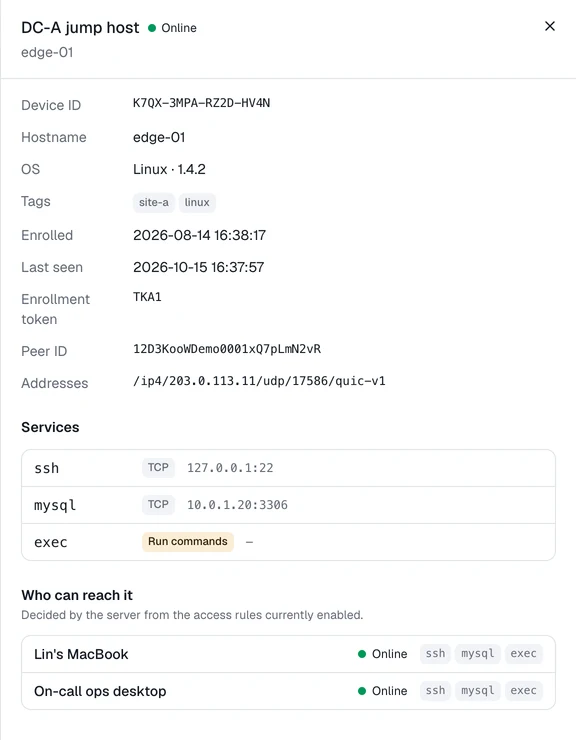
Gateway details: local SSH and a MySQL server on the LAN, plus the clients the rules allow to reach it.

Secure access to engineering resources

Familiar developer tools, connected to private resources

Dev boxes, GPU servers and databases sit on internal networks. Connect through SSH ProxyCommand and SSH-based tools work as usual, without the laptop listening on any port.

  • SSH-based tools such as VS Code Remote-SSH and JetBrains Gateway connect directly
  • Database clients connect through a local port that is remembered between sessions
  • Verify specific tools and versions in your own environment
~/.ssh/config
# ~/.ssh/config
Host gpu-01
User dev
ProxyCommand workslink proxy K7QX-3MPA-RZ2D-HV4N ssh
 
$ ssh gpu-01
dev@gpu-01:~$
Add one block to ~/.ssh/config; ssh, scp, rsync and your IDE then connect by host name.

Automation access

Let automated jobs reach remote nodes

A CI/CD runner or ops script calls workslink exec to run a command on a remote gateway, streams the output back and uses the remote exit code to decide success. The target does not need SSH exposed.

  • cmd / PowerShell on Windows; the system shell on Linux and macOS
  • Timeouts, working directory and fire-and-forget runs
  • Command execution is high-risk: enabling it requires confirmation in the console, and execution details stay on the gateway
ci / deploy.sh
$ workslink exec K7QX-3MPA-RZ2D-HV4N --timeout 2m -- df -h /data
Filesystem Size Used Avail Use% Mounted on
/dev/sdb1 1.8T 1.2T 540G 70% /data
$ echo $?
0
The command runs remotely, output streams back, and the exit code is passed through for your pipeline.

Management and control

See every path in, and close any of them, from one console

WorksLink Access uses your WorksLink organization account and member permissions; there is no separate identity system to run.

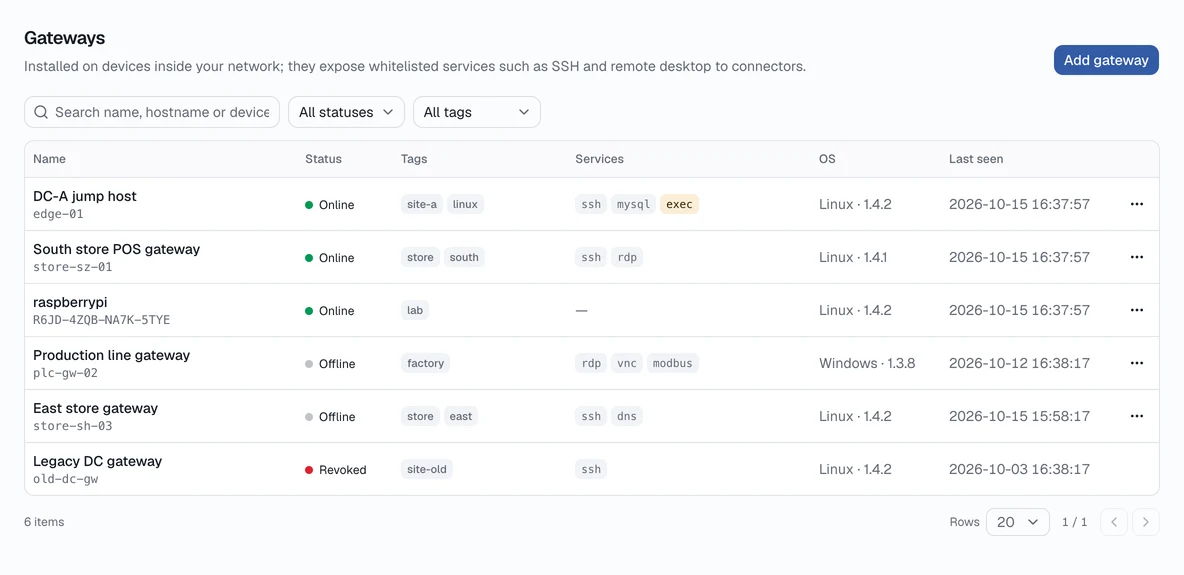
Gateways: status, tags and exposed services at a glance.
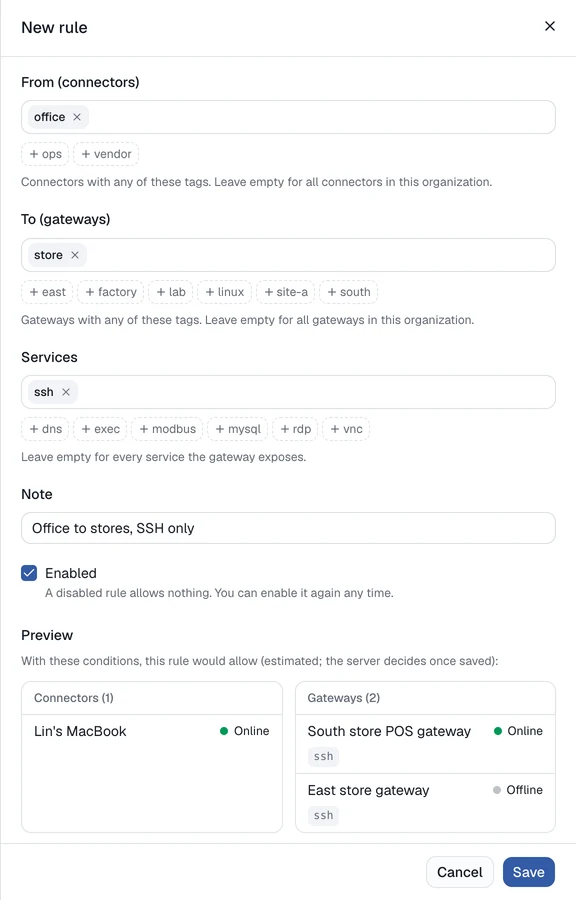
A new access rule previews which clients and gateways it would allow.

Service allowlists

Add or remove a gateway's services from the console without logging in on site. Enabling command execution requires an explicit confirmation.

Access rules with preview

Write rules by tag as clients → gateways → services. While editing, the console shows exactly what the rule would allow.

Revocation

Revoke a lost device or a departing employee in one click. New requests follow the new policy at once; online devices usually sync within seconds, and within about two minutes at most.

Activity

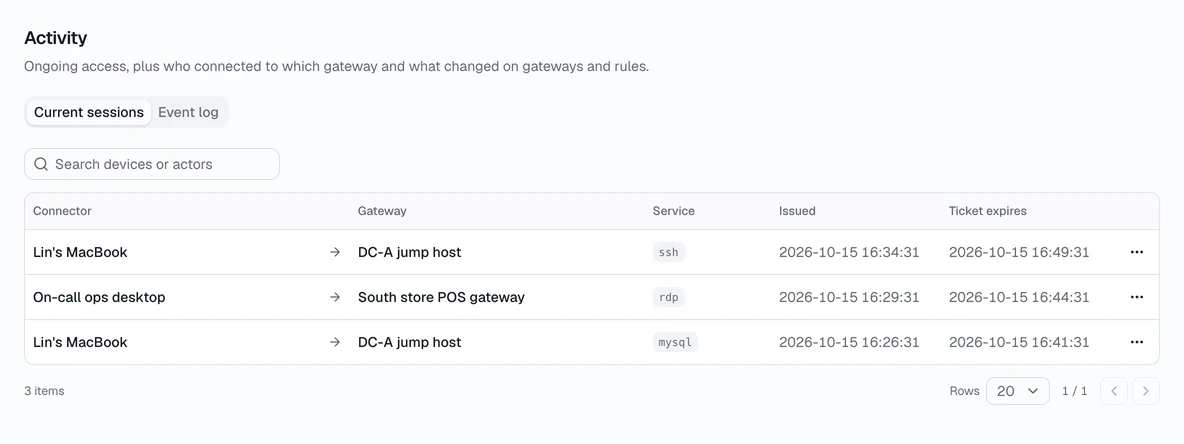
See current sessions and disconnect them; enrollment, authorization and rule changes are recorded centrally. Command execution details stay on the gateway.

Activity: current sessions and the event log.

Tools and platforms

Keep using the tools you already have

Common ways to connect

  • SSH
  • SFTP / scp / rsync
  • VS Code Remote-SSH
  • JetBrains Gateway
  • Database clients
  • Internal web apps
  • Windows Remote Desktop
  • Custom TCP / UDP ports

Supported platforms

Windows Linux macOS
Access Gateway 10 / 11, Server 2016+ x86_64, ARM64 —
Access Client 10 / 11 x86_64, ARM64 12+, Apple Silicon / Intel

The Windows gateway ships with an offline OpenSSH Server and closes the inbound rule for port 22 during setup; the Linux build is a single static binary with no runtime dependencies.

WorksLink Remote Desktop or WorksLink Access?

WorksLink Remote Desktop

When you need to see a screen, operate software or help someone on site.

About Remote Desktop →

WorksLink Access

When you need to reach servers, databases or internal systems, or let a program run commands.

Both are managed from the same WorksLink console.

Start with one gateway

Enable WorksLink Access (Secure Remote Access) in the console, add one Access Gateway and expose one service, authorize one computer, and you have your first connection.